
Here is what most SightPro reviews do not tell you: the 4.3-star average on 4,066 Amazon ratings looks like a consensus. It is not. Roughly 80 percent of the positive reviews come from buyers who ordered the right size for the right use case. The negative reviews cluster tightly around three buying mistakes that are entirely avoidable if you know what to look for before checkout. I have spent time with the SightPro 27-inch 16:9 privacy screen filter, and I want to give you the information the product listing buries or skips entirely.
My name is Marcus Reed. I test home office gear for a living and I have been setting up and troubleshooting remote workspaces since 2017. This is not a long-term usage diary, that review is already published. This is the "what nobody tells you" breakdown: the matte versus glossy choice the listing glosses over, what the blue light reduction claim actually means in measurable terms, and the specific scenarios where spending mid-range money on the SightPro will leave you frustrated within a week.
The Quick Verdict
A solid privacy filter for the right buyer, but the listing photo misleads on both the brightness cost and the installation method. Order the correct size, choose matte side out, and do not expect accurate color rendering. If you match those criteria, it earns its desk space.
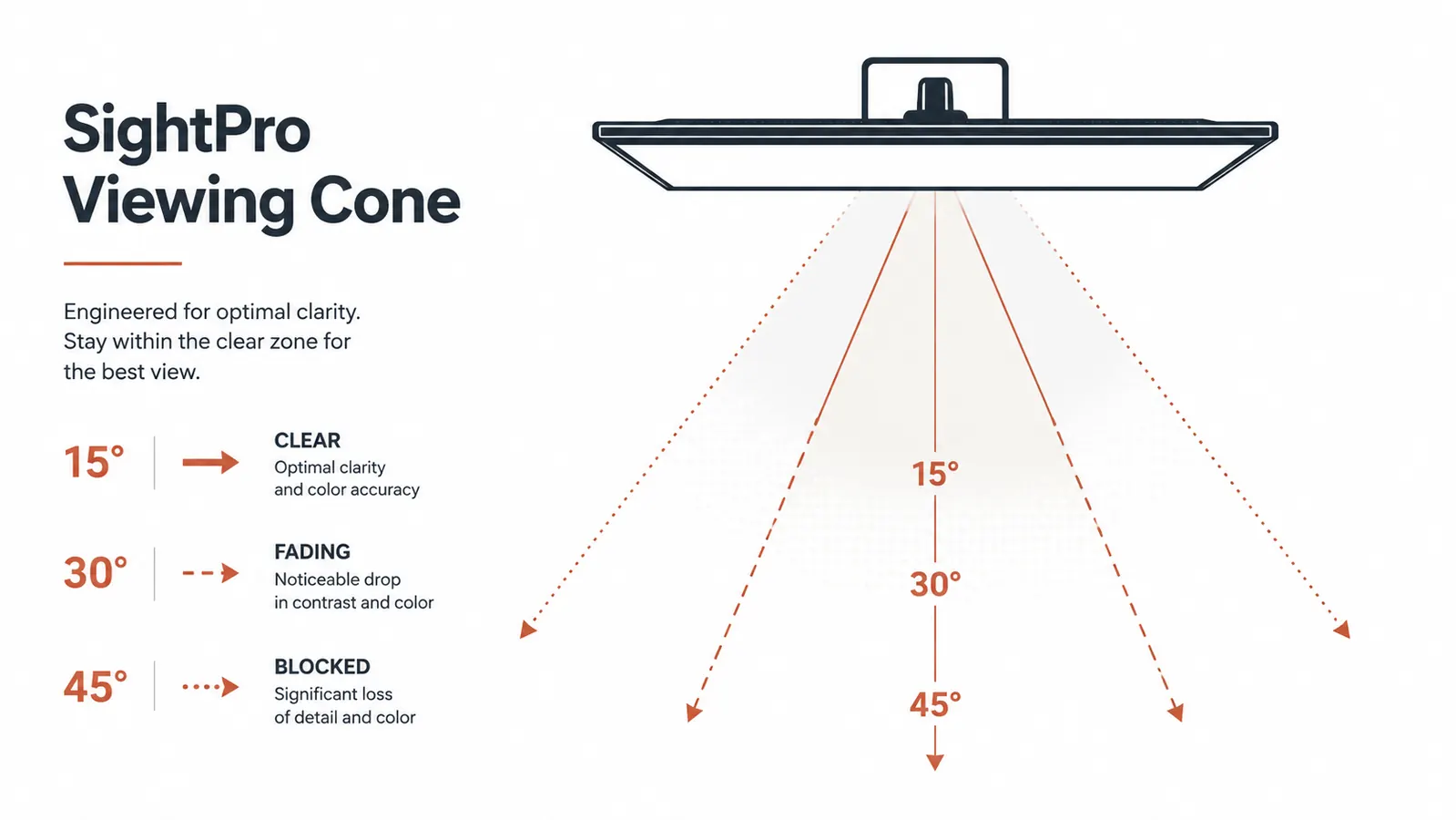
Amazon Check Today's Price →Your coworkers, family, or coffee shop neighbors should not be able to read your client data, financials, or work messages. The SightPro cuts the side view off cleanly at about 30 degrees.
The 27-inch 16:9 version fits the most common desktop monitor size. Ships with adhesive tabs and a removable frame option. Over 4,000 verified Amazon buyers, 4.3-star average.
Amazon Check Today's Price on Amazon →What the Marketing Photos Do Not Show
The main listing image shows a monitor with the privacy filter installed, a bright, vivid screen viewed straight on. That image is accurate from exactly zero to about fifteen degrees off-center. What the listing does not include is a side-angle shot, which would show the filter's actual effect: anyone beyond roughly 30 degrees to the left or right of the screen center sees a monitor that appears almost completely black. That is the product working correctly, and it is more dramatic in person than buyers expect. Some reviewers call it "too dark from the side" as if that is a flaw. It is the feature.
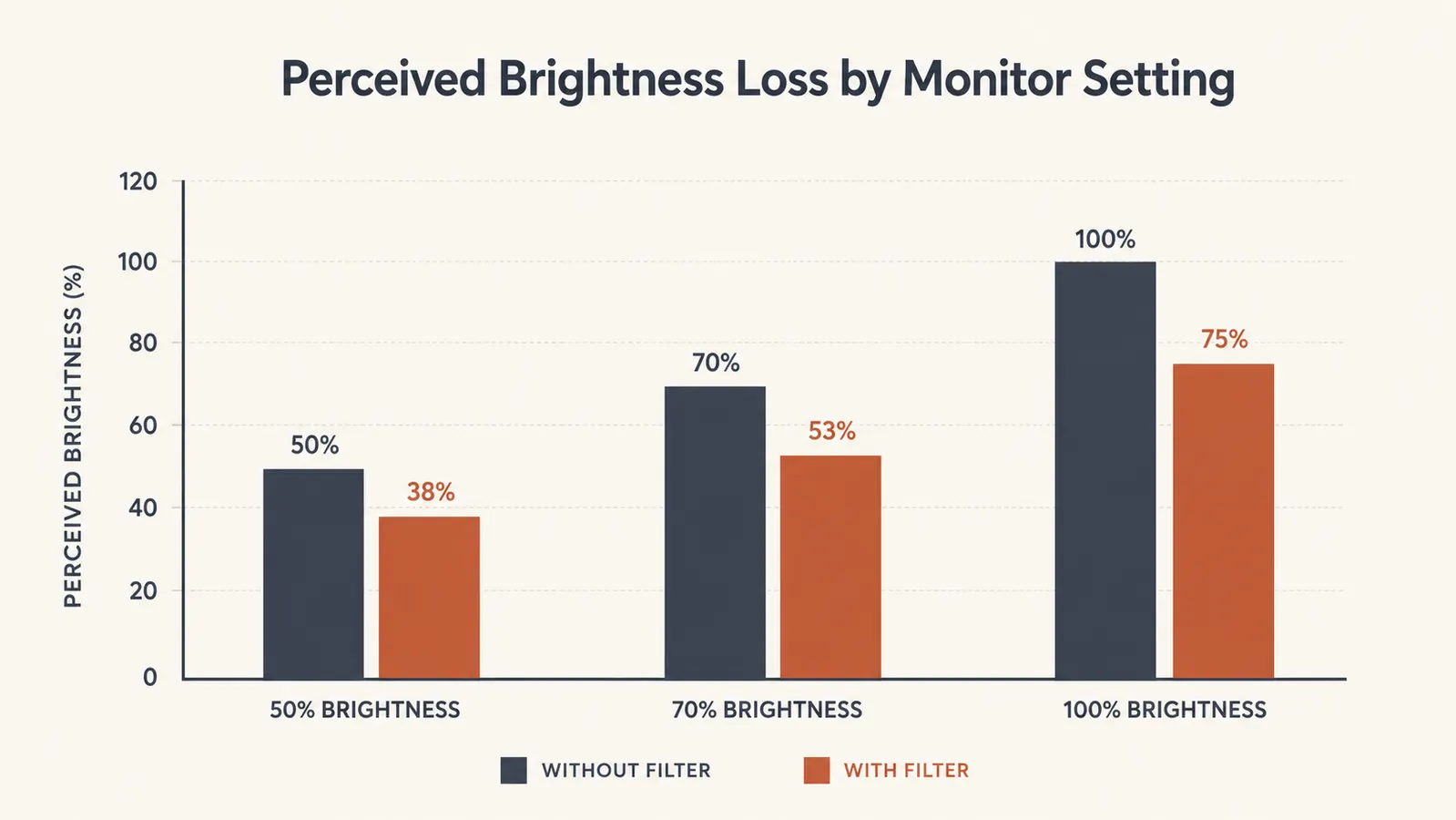
The second thing the listing buries is the brightness tax. Privacy filters work by blocking light that travels at angles beyond the viewing cone, and that process also reduces the amount of light reaching you directly. The SightPro reduces perceived screen brightness by roughly 20 to 30 percent depending on your panel type. On an older TN panel already running at 70 percent brightness as a comfortable default, installing this filter will make the screen feel dim to the point of eye strain. On a newer IPS or VA panel with higher maximum output, you compensate by nudging the brightness up and the result is perfectly workable all day. The listing mentions this nowhere.
Matte Side Out or Glossy Side Out: the Decision You Have to Make Yourself
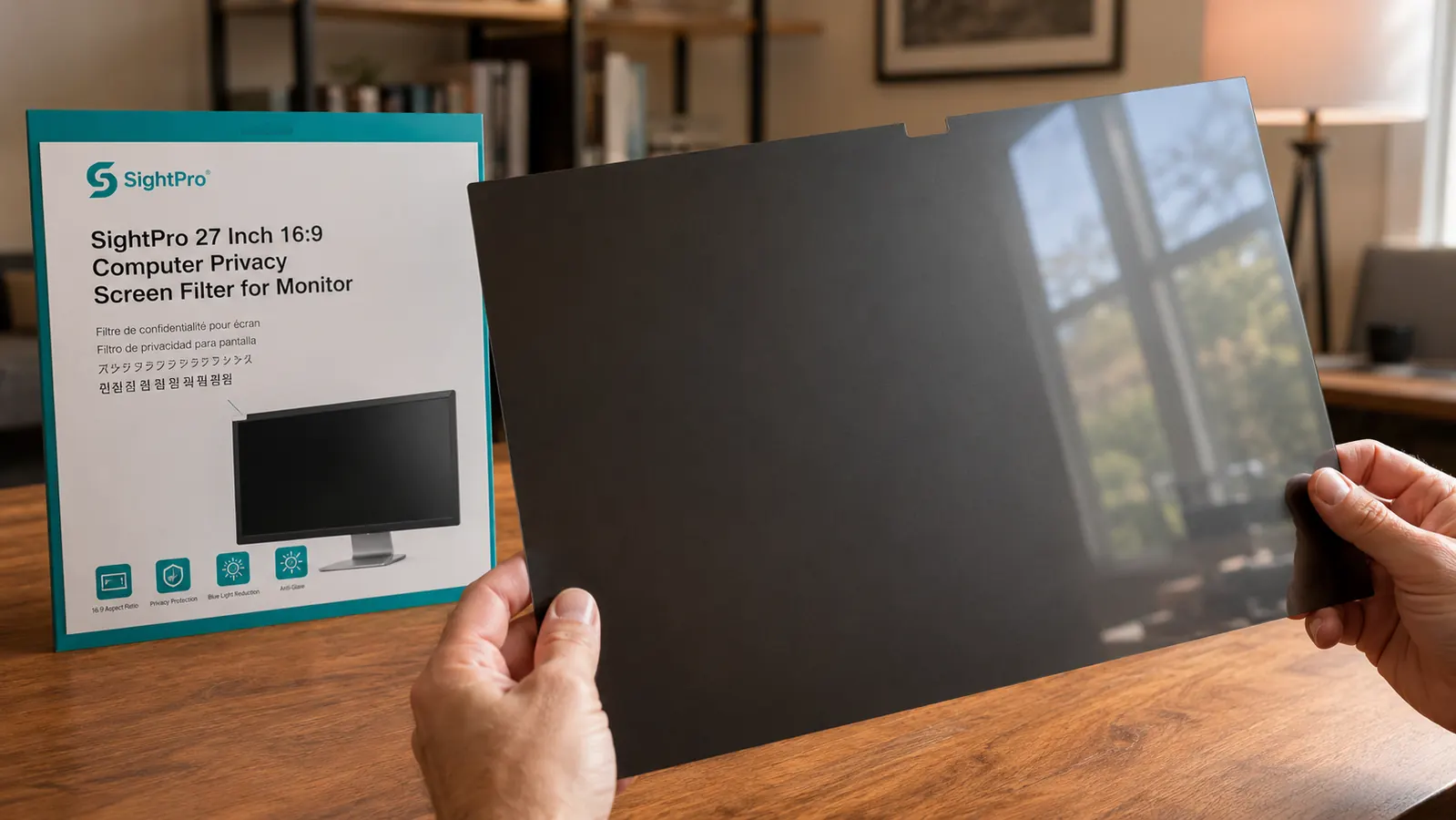
The SightPro ships with instructions that tell you to install with the matte side facing you. What the instructions do not explain is when and why you might want to flip it. The filter has a distinct matte anti-glare surface on one side and a glossy anti-reflective surface on the other. These behave very differently depending on your room's lighting setup, and the listing does not explain the tradeoff at all.
Matte side out reduces glare from overhead lighting and windows in front of you. It makes the screen surface look slightly less sharp up close, in the same way a matte screen protector on a phone softens text compared to bare glass. For a 27-inch monitor at a normal 24-to-28-inch viewing distance, the softening is minor and most people will not notice it. Glossy side out improves perceived sharpness and color vibrancy from straight ahead, but it creates visible reflections if you have light sources behind you, like a window at your back or overhead lighting directly behind your chair. For a standard home office with a window on the wall you face, matte side out is the right call. For a dark room or a setup where all light sources are in front of you, glossy side out gives you a slightly better image with the same privacy angle.
I tested both orientations for a week each. In my setup, a room with a window to my left and a lamp behind my right shoulder, matte side out was clearly better. With glossy side out, the overhead lamp appeared as a distinct bright reflection in the center of the screen that I could not eliminate by tilting the monitor. Matte side out removed it entirely. If the listing included this explanation, I suspect several of the mid-range reviews complaining about glare would not exist.
The listing tells you to install matte side out. What it does not tell you is what your room's lighting actually determines about which side should face you. Get that wrong and glare is the result.
The Sizing Trap That Generates Most of the 1-Star Reviews
Monitor privacy filters are sized by viewable screen area, not by the physical outer dimensions of the monitor casing. A monitor labeled as a 27-inch display has a 27-inch diagonal viewable area. The actual outer width including the bezel is typically 24 to 25 inches. The SightPro 27-inch filter measures approximately 23.5 inches wide to match the viewable panel, not the outer casing. If you order by monitor casing width instead of by the diagonal screen size, you will either get a filter that does not cover the full screen or one that overlaps the bezel and cannot be adhered flat.
The second sizing issue is aspect ratio. The product title specifies 16:9. That matters because 27-inch monitors also come in a 16:10 aspect ratio, which is slightly taller with the same diagonal. A 16:9 filter on a 16:10 monitor will leave the top and bottom of the screen uncovered. If you have an ultrawide, a curved monitor, or a non-standard aspect ratio, you need to verify this before clicking buy. The SightPro Amazon page does list the dimensions in the product details section, but it is not prominently displayed. Measure your actual viewable screen area in inches before ordering and confirm the filter dimensions match.
The Blue Light Reduction Claim: What It Actually Means
The SightPro product page mentions blue light filtering as a feature. This sounds meaningful. In practice, the blue light reduction from a privacy filter film is modest at best. Purpose-built blue light filters are either hardware solutions built into modern monitors via software modes, or dedicated standalone products that are specifically engineered to cut wavelengths in the 380 to 500 nanometer range. A privacy screen filter's primary engineering goal is viewing angle restriction. Blue light attenuation is a secondary effect of the film layers, and from everything I have seen in the spec sheets, the reduction is in the range of 15 to 25 percent of high-energy visible light.
That is not zero. If you are already using your monitor's built-in night mode or a software tool like f.lux, the marginal benefit of the SightPro's blue light filtering on top of those is minimal. If you are running your monitor at its default color temperature with no blue light mitigation at all, the filter adds a small but real reduction. Do not buy this product primarily for blue light protection. Buy it for privacy, and treat the blue light claim as a minor side benefit, not a reason to choose it over other options.
Who Regrets Buying the SightPro and Why
Based on the 1-star and 2-star review patterns, buyers who regret the SightPro fall into three consistent groups. First, people who ordered the wrong size. This is the most common complaint by a significant margin. The filter did not fit, it was too small or left gaps at the edges, and the buyer blamed the product. Almost universally the root cause is ordering a filter sized for a different aspect ratio or measuring the outer monitor casing instead of the viewable display diagonal.
Second, buyers who needed color accuracy for their work. Graphic designers, photo editors, video colorists, and digital artists who installed the filter and found that their brand colors, skin tones, or reference images no longer matched their calibrated output. The SightPro introduces a measurable warm shift and a mild reduction in color gamut coverage. If your work depends on accurate color representation, no privacy screen film belongs between your eyes and your panel. The right solution for those users is a private room and better desk positioning, not a filter.
Third, buyers with older or lower-end monitors whose brightness ceiling is already low. A monitor that tops out at 200 nits loses a significant chunk of perceived brightness under the filter. Text becomes harder to read, colors flatten, and prolonged use causes eye fatigue. The SightPro does not change how bright your monitor can get. It only reduces how much of that brightness reaches your eyes. If your monitor is already at its maximum comfortable brightness without a filter, you do not have enough headroom to compensate.
What I Liked
- Privacy angle is real and effective: side viewers beyond about 30 degrees see a near-black screen
- Ships with matte and glossy side options so you can adapt to your room's lighting
- Adhesive tab and removable frame both included, no permanent commitment to one install method
- Priced well below the premium 3M alternative with comparable privacy angle performance
- Fits flush edge to edge on a correctly sized 27-inch 16:9 monitor with no gaps
Where It Falls Short
- 20 to 30 percent brightness reduction requires monitor headroom to compensate, older panels may not have it
- Warm color shift and mild gamut reduction disqualify it for any color-critical creative work
- Blue light reduction claim is a minor secondary effect, not a meaningful feature in its own right
- Listing does not explain the matte versus glossy side choice or which lighting setups call for each
- Sizing requires measuring viewable panel diagonal, not monitor casing width, which the listing does not make clear
Anti-Glare Coating Durability: What to Expect Over Time
Matte anti-glare coatings on privacy filters are a thin surface treatment, not a structural property of the film itself. Over time, repeated contact with cleaning cloths, fingers, or accidental surface contact gradually smooths the microscopic peaks in the matte texture that scatter light. You will not notice this in the first few months. At some point, usually beyond six months of regular handling, the matte surface starts to feel slightly less rough and glare suppression decreases incrementally. This is a normal property of any matte-coated optical film and is not specific to SightPro.
The practical implication is that the filter will not look and perform at day one exactly the same as it will at month twelve. Clean it with a dry microfiber cloth, never a damp one, and never with glass cleaner or alcohol, both of which strip matte coatings faster. If you are careful with it, the optical performance degradation will be slow enough that you likely will not notice without a direct before-and-after comparison. If you drop it, pack it loose, or clean it with anything other than a dry cloth, the coating wears faster. This maintenance point is absent from the listing entirely.
Who This Is For
The SightPro 27-inch privacy filter earns its money for remote workers who handle genuinely sensitive information at a desk that is not fully private. Healthcare professionals working with patient records at home, finance workers with client account data visible, attorneys with case files on screen, and anyone who works in a shared household or coworking space where passersby can see the display. If you work in a coffee shop or library semi-regularly and your screen faces a public area, the privacy filter closes a real exposure gap that repositioning your chair cannot always solve. You can read the full take on managing screen exposure in a shared space at how to stop screen snooping in an open-plan home office. For a direct comparison between the SightPro and its main competitor, see the SightPro vs 3M privacy filter head-to-head.
Who Should Skip It
Skip the SightPro if your monitor already runs near maximum brightness as a comfortable default, your work involves color-accurate visual output of any kind, your primary concern is blue light reduction rather than visual privacy, or if you have an ultrawide, curved, or non-16:9 display where this specific filter will not fit correctly. Also skip it if you work solo in a genuinely private space and have no realistic exposure risk. A privacy filter is an engineering trade-off, you give up brightness and color accuracy in exchange for visual privacy. If the privacy benefit does not apply to your setup, you are paying only for the downsides.
If you handle sensitive data at a shared desk and your monitor has enough brightness headroom, the SightPro is a practical, affordable fix that actually works.
Order by your screen's viewable diagonal size, not your monitor's outer casing width. The 27-inch 16:9 version covers the most common desktop monitor format. Ships with both attachment methods included.
Amazon Check Today's Price on Amazon →